


SAP Concur
4.618.66K Reviews
App Specs
- Version
- 10.34.2
- Updated On
- License
- Free
- Downloads
- 5,000,000+
- Developer
- SAP SE
- Categories
- Business
- Platform
- Android, iOS
Screenshots
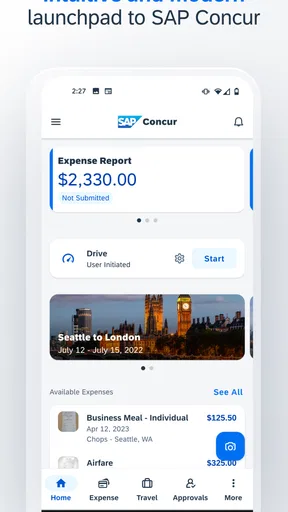

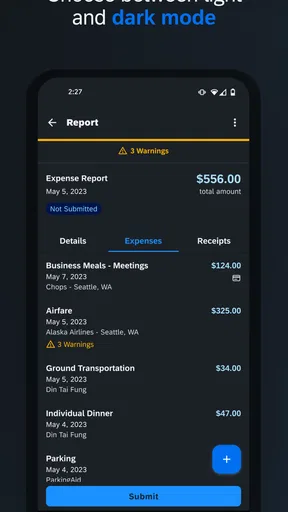
 Analysis by AppCompare
Hey there! If you’ve ever found yourself buried in a pile of receipts after a business trip, then SAP Concur might just be your new best friend. I've spent some time playing around with this app, and let me tell you, it’s like having a personal assistant in your pocket. Let's dive into what makes this app a game-changer for managing expenses.
Where the workflow can get stuck
The main thing I would check before downloading is whether your workplace already uses Concur and has enabled the parts you need. This is a business tool, not simply a personal notebook for logging every purchase. A company’s setup can shape what you can do, so an account or workflow that feels incomplete may reflect how your organization has configured access rather than a fault with the phone itself.
That distinction matters if you are self-employed or hoping to use it for a small side business. SAP Concur is made by SAP SE, and its business focus is most apparent when expenses and travel are part of an employer’s process. If you only need a personal budget, a lightweight expense tracker may be easier to start using and less tied to an organization’s routines.
For employees, the app is most useful when the person submitting expenses and the people reviewing them are working within the same process. Before relying on it during a trip, I would confirm how your organization expects you to submit a report, what records it needs, and whether you are expected to use the mobile app for travel as well as expenses. A quick check with your company’s administrator can prevent a frustrating first submission.
Getting Started with SAP Concur
The first thing I noticed about SAP Concur is how user-friendly it is. Setting up an account is a breeze, and if you're already using other SAP products, the integration is seamless. The app walks you through the setup process with easy-to-follow instructions, so you don't need to be a tech wizard to get started.
Features That Make Life Easier
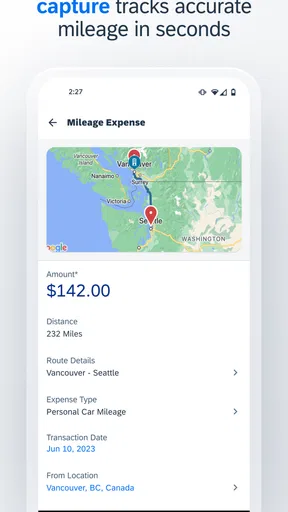
One of the standout features of SAP Concur is its ability to automatically import expenses. Yup, you heard that right. You can link your credit card, and the app will pull in transactions automatically. This saves you a ton of time and helps keep everything organized. No more manually entering each expense or worrying about losing those pesky paper receipts!
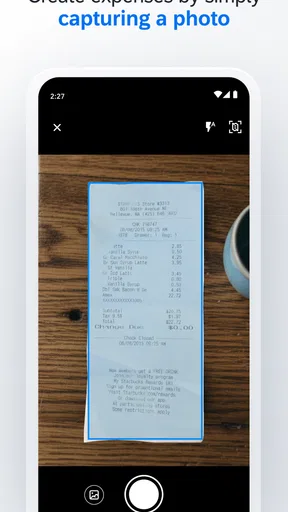
Another cool feature is receipt scanning. Just snap a pic of your receipt with your phone, and the app does the rest. It’s like magic. The app reads the details and categorizes the expense for you, so you can focus on the more important things in life—like deciding where to go for lunch with all that time you’re saving.
Worth Reading Before You Choose

EA SPORTS FC Mobile 26 Is a Bigger Football Game, but It Takes Time

Flipboard Shows What News Apps Must Do Beyond the Feed

Switching to Android Auto Means Rethinking Your Driving Routine

Google Calendar Makes a Crowded Week Easier to Manage

Ludo King Makes the Most of the Minutes Between Plans

Baby Panda World Brings Quick Play to Modern Phones, but Its Game Library Feels Busy
Setup checks that save time later
I would treat a linked card and a photographed receipt as ways to reduce typing, not as a reason to stop checking the report. A transaction can appear without telling the whole story of a purchase, and a receipt image is only useful if its important details are readable. A practical habit is to review the amount, date, and business purpose while the purchase is still fresh, then keep the original receipt until your organization’s process says it is no longer needed.
For a meal with several people, for example, a clear receipt may still need context about who attended and why the expense was work-related. That information is easy to forget days later. I would add it while preparing the expense rather than waiting until the end of a busy month, when small details blur together.
There is also a trade-off in automatic imports: less manual entry can mean a quicker report, but imported activity still needs a human check. If a charge is pending, duplicated, unfamiliar, or connected to a personal purchase, do not assume the app has already resolved what it means. Review it against your card statement and your employer’s expense rules before submitting.
Traveling Made Simple
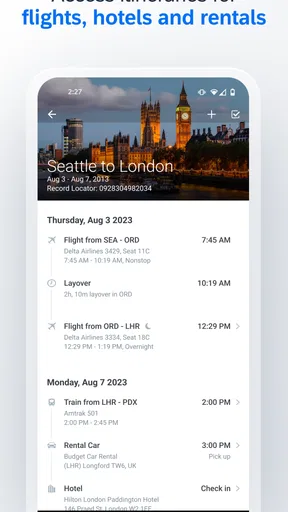
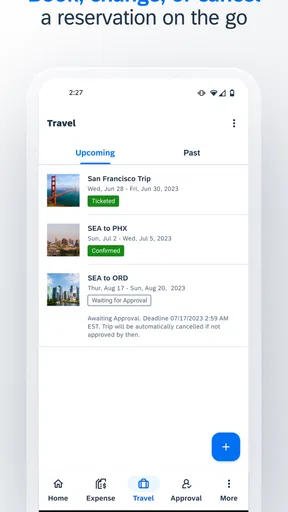
If you travel a lot for work, the travel booking feature is going to be your favorite part. You can book flights, hotels, and rental cars directly through the app. Plus, it keeps all your itineraries in one place. It’s like having a travel agent available 24/7.
What's even better? The app sends you real-time alerts about your trip. Flight delayed? You'll know right away. Lost your hotel confirmation? No worries—it's all saved in the app. This feature alone is worth its weight in gold if you're on the road often.
A realistic trip-day routine
Picture a workday that starts with a flight, continues with a client meeting, and ends with dinner away from home. I would use the itinerary view as a convenient reference during the day, photograph receipts close to the time of each purchase, and make a short note about the business reason before moving on. That small routine makes it easier to prepare a complete expense report later, without trying to reconstruct the trip from a wallet full of paper.
Travel organization is especially helpful when plans change, but I would still keep an eye on the details that matter outside the app. A notification can draw attention to a change; it does not remove the need to confirm the current arrangements with the relevant travel provider. In the same way, keeping confirmations together is handy, but I would not treat a phone as my only source of information when I need to make a time-sensitive decision.
Compared with booking each travel item through separate consumer services and tracking costs in a spreadsheet, Concur can bring work travel and expenses into one business-oriented routine. That convenience is strongest when your employer’s process supports it. A traveler who mainly wants to compare options across many booking sites may prefer dedicated travel tools, while someone who needs to submit work costs alongside a company itinerary may value having those tasks closer together.
Recovering when something goes wrong
If a receipt does not scan cleanly, I would first retake the photo in good light, lay the receipt flat, and make sure the edges and printed details are visible. If a transaction is missing, checking whether it has appeared on the card account and whether the correct account is connected is a sensible first step. For a report that seems stuck, I would check the screen for required fields or messages before repeatedly resubmitting it, since duplicate attempts can create more confusion.
When the app behaves differently from what you expect, a useful order is to check your connection, close and reopen the app, and make sure you are using a current version. SAP Concur’s current version is 10.31.0, and it supports devices running Android 9 or later. If the problem concerns company access, a card connection, approval status, or a travel arrangement, the right person to contact may be your organization’s administrator or the relevant provider rather than general app support.
For a missing confirmation or an expense that does not match your records, compare the information in the app with the original email, receipt, or card statement before changing anything. Keeping a simple note of what you checked can make it easier to explain the issue if you need help. I find that approach more useful than assuming every mismatch is a technical failure.
When the app may not be the cause
Not every delay is something you can fix from your phone. An expense awaiting review may depend on an approval process, and an unavailable option may reflect your organization’s configuration or account access. Likewise, travel changes can originate with a carrier, hotel, or rental provider. The app can help keep the work organized, but it cannot make another party update its records instantly.
This is why I would separate a technical problem from a process question. If you can open the app but cannot see a company-specific option, ask the person who manages your organization’s Concur setup. If a charge or booking looks wrong, check the underlying receipt or provider record. If the app itself will not open or repeatedly fails during a basic task, then troubleshooting the device and contacting support makes more sense.
Security and Support
Security is a big deal when it comes to managing expenses, and SAP Concur takes this seriously. The app uses top-notch encryption to keep your data safe. Plus, if you ever run into issues, their support team is super responsive. You can reach out via chat, email, or phone, and they’re always ready to help.
Another thing to note is the app's flexibility. Whether you're a freelancer, a small business owner, or part of a large corporation, SAP Concur adapts to your needs. You can customize expense categories, approval workflows, and more, making it a versatile tool for any user.
Who will get the most from it
I see the clearest fit for people who travel for work or regularly submit business expenses through an organization that already uses Concur. It can help them keep purchases, receipts, and travel details in a single work-focused routine instead of piecing them together from email, camera photos, and a spreadsheet. A manager or finance team may also find the connected process more useful than a collection of unrelated personal tools.
By contrast, I would not choose it as my first option for household budgeting, tracking shared personal costs, or simply recording occasional purchases. Those jobs usually call for a simpler app with fewer company-specific steps. Even for business use, someone whose employer has not adopted Concur may find little value in setting it up alone, because the strongest benefits depend on the surrounding work process.
The app is free, is rated for Everyone, and has an average rating of 4.6 from around 121,000 ratings. It has been installed over 5 million times, which gives a sense of its reach, but those figures do not tell me whether it will suit a particular company’s setup. I would base that decision on whether your employer supports it and whether you actually need the travel-and-expense workflow.
The Bottom Line
To wrap it up, SAP Concur is a powerhouse app that takes the headache out of managing expenses and business travel. It's intuitive, feature-packed, and designed to save you time and hassle. Whether you’re an individual or part of a team, this app has got your back.
If you’re ready to streamline your expense tracking and travel bookings, give SAP Concur a try. It might just be the productivity boost you’ve been looking for.
My practical advice is to confirm your organization’s setup before depending on it for a trip, then build the habit of checking receipts and imported charges as you go. That is where a mobile expense tool can genuinely save effort: not by making every decision for you, but by making the records easier to gather while the details are still at hand.
Pros
- Streamlines expense reporting efficiently.
- Integrates with major financial systems.
- User-friendly interface with intuitive navigation.
- Offers mobile receipt capture feature.
- Strong customer support and resources.
Cons
- Occasional syncing issues with bank feeds.
- Limited customization for report templates.
- Some features require premium subscription.
- Initial setup can be time-consuming.
- Mobile app lacks some desktop features.
FAQs for SAP Concur
What is SAP Concur and what does it do?
SAP Concur is a comprehensive expense management solution designed for businesses of all sizes. It streamlines processes related to travel, expenses, and invoice management, allowing users to easily track and manage their spending. By integrating with various apps and services, it provides real-time data and insights, enhancing financial transparency and control.
Is SAP Concur secure for handling sensitive financial data?
Yes, SAP Concur prioritizes security and compliance. It employs robust security measures, including data encryption, secure access controls, and regular security audits, to protect sensitive financial data. Additionally, it complies with global standards and regulations like GDPR, ensuring that users' data is handled with the utmost care and security.
Can SAP Concur integrate with other business tools and applications?
Absolutely, SAP Concur offers seamless integration with a wide range of third-party tools and applications. This includes popular accounting software, travel booking platforms, and enterprise resource planning (ERP) systems. These integrations help streamline workflows by ensuring data consistency and reducing the need for manual data entry.
How user-friendly is the SAP Concur app for everyday use?
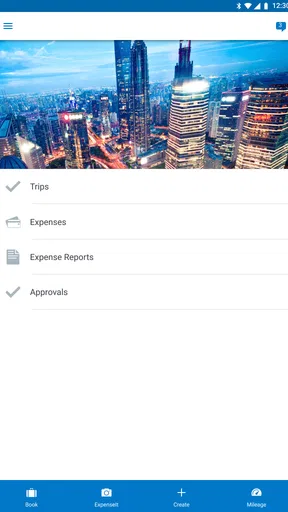
SAP Concur is designed with user-friendliness in mind. Its intuitive interface allows users to easily navigate through various features, such as submitting expenses, booking travel, and approving invoices. The app also offers mobile functionality, enabling users to manage their tasks on-the-go, making it accessible and convenient for everyday use.
What kind of support does SAP Concur offer to its users?
SAP Concur provides comprehensive support to its users through various channels. This includes online resources like guides and tutorials, a dedicated help center, and customer support via phone or chat. Users can also access community forums for peer support. This extensive support network ensures users can resolve issues and maximize the app's potential.


